Database Locking Strategies
What You'll Learn
By the end of this page, you will be able to:
- Explain why locking is necessary in concurrent database environments
- Identify the types of locks (shared, exclusive, intent, update) and their granularity levels
- Compare pessimistic vs optimistic locking — how each works, when to use each, and their trade-offs
- Recognize and prevent deadlocks
- Understand lock escalation and its impact on performance
- Choose the right locking strategy using a decision framework
The Concurrency Problem
Imagine a concert ticket system. There is one seat left, and two users try to book it at the exact same time:
User A: READ seat → status = "available"
User B: READ seat → status = "available"
User A: UPDATE seat → status = "booked by A"
User B: UPDATE seat → status = "booked by B"
Both users read "available", both update it, and the seat is double-booked. This is a race condition — and it happens whenever multiple transactions access the same data concurrently without coordination.
What can go wrong without locking?
| Problem | Description | Example |
|---|---|---|
| Lost Update | Two transactions overwrite each other's changes | Both users book the last seat |
| Dirty Read | Reading uncommitted data from another transaction | Reading a balance mid-transfer |
| Non-Repeatable Read | Reading the same row twice gets different values | Row modified between two reads in the same transaction |
| Phantom Read | Re-running a query returns a different set of rows | New rows inserted between queries |
Locks are the primary mechanism databases use to coordinate concurrent access and prevent these problems.
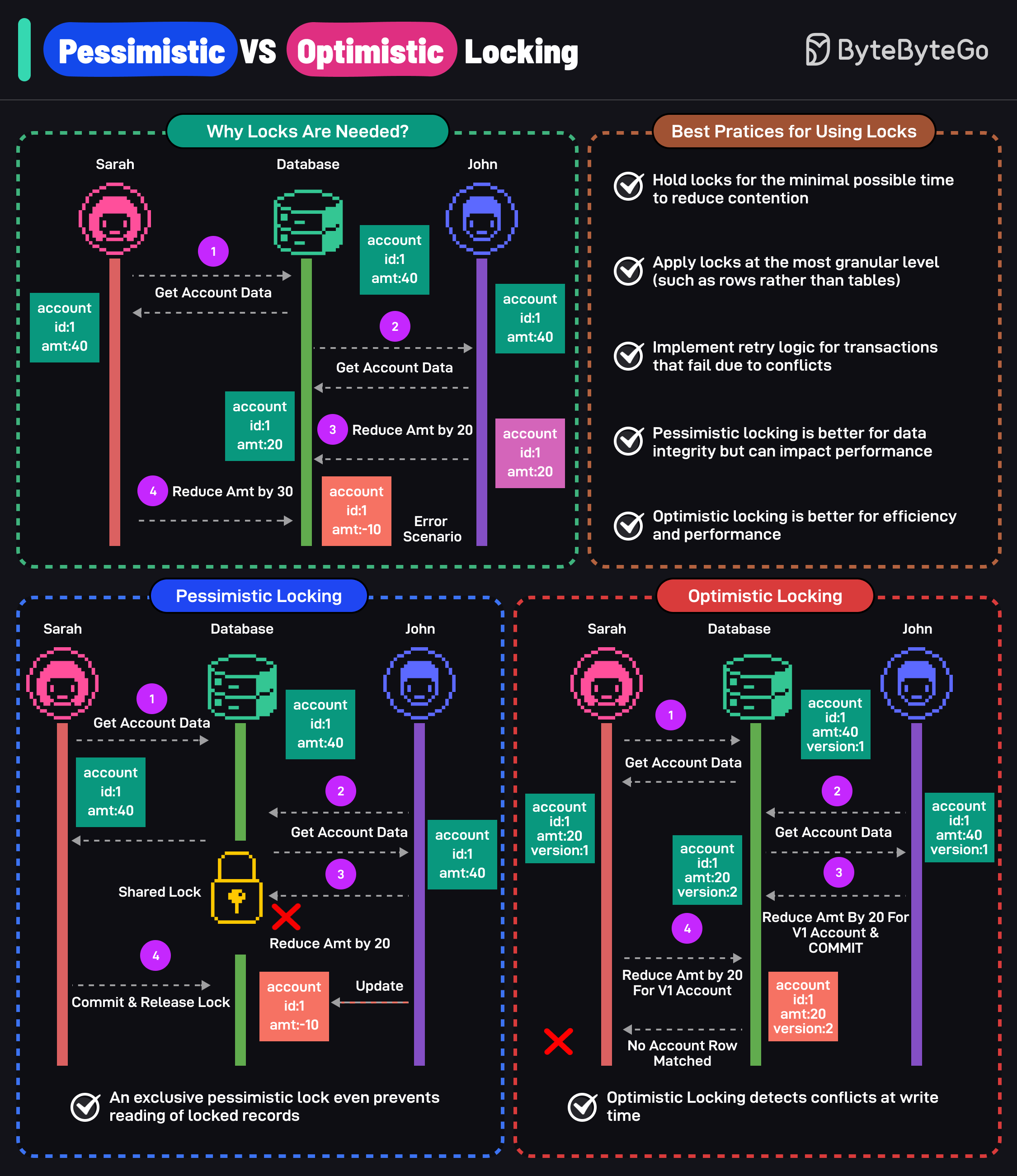
Lock Fundamentals
Before comparing strategies, understand the building blocks.
Lock types
| Lock Type | Scope | Compatible With | Purpose |
|---|---|---|---|
| Shared Lock (S) | Row / Page / Table | Other shared locks | Allow concurrent reads |
| Exclusive Lock (X) | Row / Page / Table | No other locks | Prevent all concurrent access |
| Intent Shared (IS) | Table | Other intent locks | Signal: "I may lock a row in shared mode" |
| Intent Exclusive (IX) | Table | IS locks, but not S locks on same resource | Signal: "I may lock a row in exclusive mode" |
| Update Lock (U) | Row | Shared locks, but not other U/X locks | Prevent deadlock when upgrading S → X |
Compatibility matrix — which locks can coexist on the same resource:
         S    X    IS    IX    U
  S     ✓    ✗    ✓     ✗    ✓
  X     ✗    ✗    ✗     ✗    ✗
  IS    ✓    ✗    ✓     ✓    ✓
  IX    ✗    ✗    ✓     ✓    ✗
  U     ✓    ✗    ✓     ✗    ✗
Lock granularity
Choosing the right granularity balances consistency against performance:
| Granularity | Lock Scope | Concurrency | Overhead | Use Case |
|---|---|---|---|---|
| Database | Entire database | None | Very low | Maintenance, backups |
| Table | All rows in a table | Very low | Low | Bulk operations, schema changes |
| Page | A block of rows | Moderate | Moderate | Some database engines default |
| Row | Single row | High | Higher | Most OLTP operations |
Always apply locks at the most granular level (rows rather than tables) to minimize contention and maximize concurrency.
Lock lifecycle
Every lock follows the same lifecycle:
- Request — a transaction asks the lock manager for a lock
- Granted or Blocked — if compatible with existing locks, it's granted; otherwise the transaction waits
- Held — the lock is active for the duration of the transaction
- Released — the lock is released on
COMMITorROLLBACK
Pessimistic Locking
Pessimistic locking assumes conflicts will occur. It acquires a lock on the data before any modifications are made, preventing other transactions from reading or modifying the locked data until the lock is released.
How it works
Two transactions compete for the same products row (id=1, stock=10). Transaction A acquires the lock first — Transaction B must wait until A commits.
Key characteristic: Transaction B is physically blocked at the database level — it cannot proceed until A releases the lock.
SQL commands
-- Pessimistic read lock (shared lock)
SELECT * FROM orders WHERE id = 100 LOCK IN SHARE MODE;

-- Pessimistic write lock (exclusive lock)
SELECT * FROM orders WHERE id = 100 FOR UPDATE;

-- PostgreSQL: advisory lock (application-level)
SELECT pg_advisory_lock(12345);
SELECT pg_advisory_unlock(12345);

-- SQL Server: hint-based locking
SELECT * FROM orders WITH (UPDLOCK, HOLDLOCK) WHERE id = 100;
When to use pessimistic locking
- High contention — many transactions compete for the same rows (e.g., ticket booking, inventory management)
- Critical data integrity — the cost of a conflict is unacceptable (e.g., financial transactions)
- Short transactions — locks are held briefly, minimizing blocking time
- Real-time consistency required — users must see the most up-to-date state
Drawbacks
- Reduced concurrency — other transactions are blocked while locks are held
- Deadlocks — two transactions wait on each other's locks indefinitely
- Performance bottleneck — long-running transactions hold locks and block the system
Optimistic Locking
Optimistic locking assumes conflicts are rare. It allows multiple transactions to read and modify data concurrently without acquiring locks upfront. Instead, it checks for conflicts at commit time. If a conflict is detected, the transaction is rolled back and must be retried.
How it works
Optimistic locking typically uses a version column or timestamp column to detect conflicts:
Transaction A:                          Transaction B:
Read product (version = 1)
                                        Read product (version = 1)
Update: SET stock = stock - 1,
        version = version + 1
WHERE id = 1 AND version = 1
→ 1 row updated ✓
                                        Update: SET stock = stock - 1,
                                                version = version + 1
                                        WHERE id = 1 AND version = 1
                                        → 0 rows updated ✗ (version is now 2)
                                        → Conflict detected, retry or abort
Key characteristic: No locks are held — Transaction B proceeds freely and only discovers the conflict when it tries to commit.
Implementation approaches
1. Version column (recommended)
-- Add version column
ALTER TABLE products ADD COLUMN version INT DEFAULT 0;

-- Read
SELECT id, stock, version FROM products WHERE id = 1;
-- Returns: id=1, stock=10, version=3

-- Update (check version)
UPDATE products
SET stock = stock - 1, version = version + 1
WHERE id = 1 AND version = 3;
-- If rowcount = 1 → success
-- If rowcount = 0 → conflict, another transaction modified it
2. Timestamp column
-- Add timestamp column
ALTER TABLE products ADD COLUMN modified_at TIMESTAMP DEFAULT NOW();

-- Read
SELECT id, stock, modified_at FROM products WHERE id = 1;

-- Update (check timestamp)
UPDATE products
SET stock = stock - 1, modified_at = NOW()
WHERE id = 1 AND modified_at = '2025-01-15 10:30:00';
-- If rowcount = 0 → conflict detected
3. Column checksum (all-column verification)
-- Update checking all original values
UPDATE products
SET stock = stock - 1
WHERE id = 1
  AND stock = 10       -- original value
  AND name = 'Widget'  -- original value
  AND price = 9.99;    -- original value
-- If rowcount = 0 → something changed, conflict
EF Core optimistic concurrency
// Configure concurrency token
protected override void OnModelCreating(ModelBuilder modelBuilder)
{
    modelBuilder.Entity<Product>()
        .Property(p => p.Version)
        .IsRowVersion()
        .IsConcurrencyToken();
}

// Usage with retry logic
var maxRetries = 3;
for (var i = 0; i < maxRetries; i++)
{
    try
    {
        var product = await context.Products.FindAsync(id);
        product.Stock -= 1;
        await context.SaveChangesAsync();
        break; // success
    }
    catch (DbUpdateConcurrencyException)
    {
        if (i == maxRetries - 1) throw;
        // Detach stale entities and retry
        foreach (var entry in context.ChangeTracker.Entries())
            entry.State = EntityState.Detached;
    }
}
When to use optimistic locking
- Low contention — conflicts are rare (e.g., user profile updates, wiki edits)
- High read volume — many reads, few writes to the same rows
- Distributed systems — locking across services is impractical
- Long transactions — holding pessimistic locks for a long time is costly
Drawbacks
- Retry overhead — failed transactions must be retried by the application
- Wasted work — the transaction does all its work and then discovers a conflict
- Not suitable for high contention — frequent retries negate the performance benefit
Interactive Visualization
Watch how pessimistic and optimistic locking handle two concurrent transactions competing for the same row. Switch between strategies to see the difference.
Lock data before modifying — other transactions are BLOCKED until the lock is released. Prevents conflicts but reduces concurrency.
Deadlocks
A deadlock happens when two transactions each hold a lock the other needs — neither can proceed.
Detection and resolution
Most databases detect deadlocks automatically by checking for circular wait in the lock graph. When found, the database:
- Selects a victim transaction (usually the one that has done the least work)
- Rolls it back and releases its locks
- Returns an error to the application (e.g., error code 1205 in SQL Server)
The application must catch this error and retry the transaction.
Prevention strategies
| Strategy | How it works | Effectiveness |
|---|---|---|
| Consistent lock ordering | Always acquire locks in the same order across all transactions | Eliminates circular wait — the most effective prevention |
| Short transactions | Minimize the time between lock acquisition and release | Reduces the window for deadlocks to form |
| Lock timeouts | Set lock_timeout so transactions don't wait indefinitely | Prevents indefinite blocking, but doesn't prevent deadlocks |
| Lower isolation levels | Use the weakest isolation level that meets your requirements | Reduces the number and duration of locks held |
With pessimistic locking, always implement deadlock retry logic in your application. Deadlocks are not bugs — they are expected in concurrent systems.
Lock Escalation
Lock escalation is when a database converts many fine-grained locks (row-level) into a coarser lock (page-level or table-level) to reduce memory overhead.
Why it happens
Managing thousands of individual row locks consumes significant memory. When a transaction exceeds a threshold, the database escalates:
- SQL Server escalates at approximately 5,000 locks per object
- PostgreSQL uses a different approach — it doesn't escalate but uses predicate locks for serializable isolation
Impact
- Reduces lock management overhead and memory usage
- Decreases concurrency — unrelated queries on the same table may be blocked
- Can cause unexpected performance degradation in OLTP workloads
How to manage
- Break large batch operations into smaller chunks — process 1,000 rows at a time instead of 100,000
- Use appropriate isolation levels — don't over-isolate
- Monitor lock counts — use
sys.dm_tran_locks(SQL Server) orpg_locks(PostgreSQL) - SQL Server: use
ALTER TABLE ... SET (LOCK_ESCALATION = DISABLE)cautiously — it prevents escalation but may increase memory pressure
Pessimistic vs Optimistic: Comparison
Side-by-side comparison
| Pessimistic Locking | Optimistic Locking | |
|---|---|---|
| Assumption | Conflicts will happen | Conflicts are rare |
| Lock timing | Before reading/modifying | Only checked at commit |
| Blocking | Yes — other transactions wait | No — transactions proceed freely |
| Conflict handling | Prevention (block until safe) | Detection (rollback and retry) |
| Concurrency | Lower (serialized access) | Higher (parallel access) |
| Deadlock risk | Yes (lock ordering needed) | No (no locks held) |
| Best for | High contention, critical data | Low contention, read-heavy |
| Implementation | Database-level (FOR UPDATE) | Application-level (version column) |
| Performance | Can degrade under load | Better throughput, retry cost on conflict |
Decision guide
Use this flowchart to choose the right strategy for your scenario:
Common Pitfalls
- Holding locks too long — long-running transactions with pessimistic locks block other users and degrade performance. Keep transactions short.
- Lock escalation — databases may escalate row locks to table locks when many rows are locked. This can unexpectedly reduce concurrency.
- Missing retry logic — optimistic locking without retry logic causes user-facing errors instead of transparent recovery.
- Ignoring deadlocks — with pessimistic locking, always implement deadlock detection and retry logic in your application.
- Using
SELECT FOR UPDATEfor reads — only use it when you intend to modify. Unnecessary exclusive locks hurt concurrency.
Best Practices
- Hold locks for the minimum time — reduce contention by keeping transactions short
- Lock at the finest granularity — prefer row-level locks over table-level locks
- Implement retry logic — handle optimistic concurrency failures and deadlocks gracefully
- Choose the right strategy — pessimistic for high-contention critical data, optimistic for low-contention scenarios
- Monitor lock waits — use database monitoring to detect lock contention hotspots
- Use appropriate isolation levels — match the isolation level to your consistency requirements
Interview Questions
1. What is the difference between pessimistic and optimistic locking?
| Pessimistic | Optimistic | |
|---|---|---|
| Strategy | Prevent conflicts by locking data upfront | Detect conflicts at commit time |
| Mechanism | Database locks (FOR UPDATE, LOCK IN SHARE MODE) | Version column, timestamp, or row hash |
| When conflicts occur | Other transactions are blocked | The losing transaction is rolled back |
| Best for | High contention, critical data | Low contention, read-heavy workloads |
| Trade-off | Lower concurrency, stronger consistency | Higher concurrency, retry cost on conflict |
2. When would you choose pessimistic locking over optimistic locking?
Choose pessimistic locking when:
- High contention — many users update the same rows frequently (e.g., ticket booking, inventory deduction)
- Data integrity is critical — the business cannot tolerate lost updates (e.g., bank account transfers)
- Conflicts are expensive — retrying the entire operation is more costly than blocking (e.g., complex calculations before the update)
- Short transactions — locks are held briefly, so blocking time is minimal
3. How does optimistic locking detect conflicts?
Optimistic locking detects conflicts by checking that data has not changed since it was read:
- Read the row along with its version number (or timestamp)
- When updating, include a
WHERE version = <original_version>condition - Check the row count of the update:
rowcount = 1→ no conflict, update succeeded, version incrementedrowcount = 0→ conflict detected, another transaction modified the row first
- On conflict, the application must retry or abort the operation
4. What are deadlocks and how do you prevent them?
A deadlock occurs when two transactions each hold a lock that the other needs, creating a circular wait:
Transaction A: locks Row 1, waiting for Row 2
Transaction B: locks Row 2, waiting for Row 1
→ Neither can proceed → Deadlock
Prevention strategies:
- Consistent lock ordering — always acquire locks in the same order across all transactions
- Short transactions — minimize the time locks are held
- Lower isolation levels — use the weakest isolation level that meets your requirements
- Lock timeouts — set
lock_timeoutso transactions don't wait indefinitely - Retry logic — catch deadlock errors and retry the transaction
Most databases detect deadlocks automatically and abort one transaction (the "victim") to break the cycle.
5. How do you implement optimistic locking in EF Core?
// Configure a concurrency token
modelBuilder.Entity<Product>()
    .Property(p => p.Version)
    .IsRowVersion();  // SQL Server: rowversion; PostgreSQL: xmin

// Or use a manual concurrency token
modelBuilder.Entity<Product>()
    .Property(p => p.Version)
    .IsConcurrencyToken();

// Handle DbUpdateConcurrencyException with retry
try
{
    product.Stock -= 1;
    await context.SaveChangesAsync();
}
catch (DbUpdateConcurrencyException ex)
{
    // Option 1: Reload and retry
    await ex.Entries.Single().ReloadAsync();
    // Option 2: Resolve manually (merge changes)
    // Option 3: Let the user decide
}
6. What is lock escalation and why does it matter?
Lock escalation is when a database converts many fine-grained locks (row-level) into a coarser lock (page-level or table-level) to reduce memory overhead.
Why it matters:
- Reduces lock management overhead but decreases concurrency
- Can cause unexpected blocking of unrelated queries
- Triggered when a transaction exceeds a threshold of locks (e.g., SQL Server escalates at ~5,000 locks)
How to manage it:
- Break large batch operations into smaller chunks
- Use appropriate isolation levels
- In SQL Server: use
ALTER TABLE ... SET (LOCK_ESCALATION = DISABLE)cautiously - Monitor with
sys.dm_tran_locks(SQL Server) orpg_locks(PostgreSQL)
Learn More
- ACID Properties — the foundation of transaction guarantees
- Database Indexing — how indexes speed up reads
- Database Replication — how data is copied across nodes